
What makes a mouse suitable for left-handed use?
A mouse is suitable for left-handed use when its shape, button placement, and side support are designed for the left hand instead of merely tolerable for it. The key point is not whether a left-handed user can physically click the mouse, but whether the mouse feels natural and efficient in left-handed operation.
True left-handed suitability usually means the main thumb-side features are placed on the right side of the shell from a standard top view, so they fall under the left thumb during use. That matters much more than marketing language, because many supposedly neutral mice are still optimized around right-handed assumptions.
A good left-handed mouse should also keep normal fundamentals in place. Sensor behavior, click feel, connection stability, and overall comfort still matter, because a left-handed layout alone does not make a weak mouse into a good one.
The best shapes and button layouts for left-handed mice are the ones that genuinely mirror left-hand use instead of forcing a right-handed pattern onto the opposite hand. In practice, that usually means either a true left-handed ergonomic shell or a genuinely well-balanced ambidextrous shape.
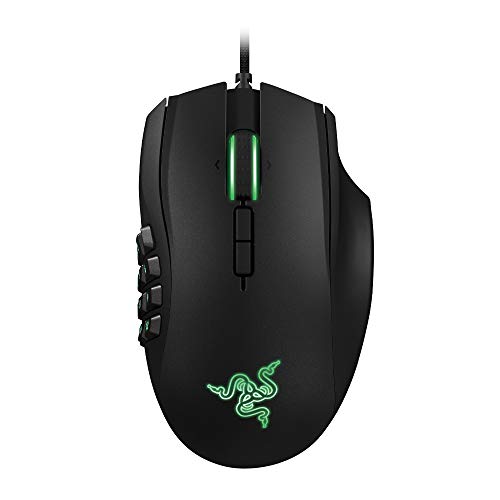
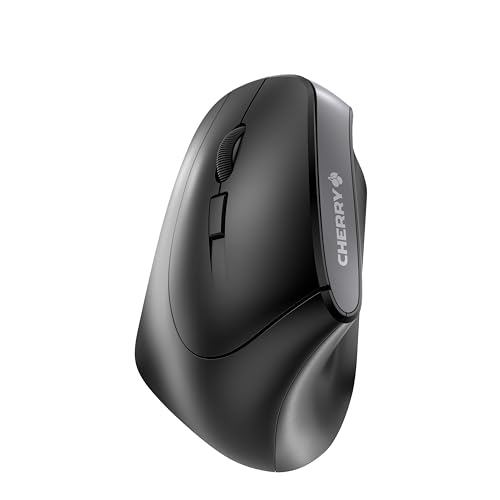
For buyers who want extra controls, button placement matters more than button count alone. In this category, some left-handed options stay with a simple side-button layout while others push toward much denser command-heavy designs. Those create very different left-handed experiences even when both technically qualify as left-handed mice.
So the best layout depends on your task. Simpler left-handed shapes work better for general office use and lower learning friction, while denser button layouts make more sense only if your games or workflows actually benefit from them.

Are ambidextrous mice good for left-handed users?
Ambidextrous mice can be good for left-handed users, but they are not automatically as good as truly left-handed mice. A well-designed ambidextrous mouse gives the left hand a more neutral usable shell, while a real left-handed mouse goes further by placing support and controls specifically around left-handed use.
The advantage of an ambidextrous mouse is broader availability. Left-handed users often have far more ambidextrous choices than strictly left-handed ones, especially if they want lower weight, simpler shapes, or newer sensor generations.
The tradeoff is that ambidextrous does not always mean equally optimized. Many ambidextrous mice are merely symmetrical in shape, while side buttons, comfort details, or software assumptions still favor right-handed habits. That is why a true left-handed mouse remains the stronger choice when left-hand-specific ergonomics matter most.
How much do the best left-handed mice cost?
The best left-handed mice usually cost about 40-£100, with the lower end represented by a simpler Cherry work-oriented model and the upper end represented by a much more specialized Razer gaming model. That is a wide spread for such a tiny category, but it reflects how differently the available left-handed options are positioned.
In practical terms, left-handed mouse pricing is driven more by specialization than by a normal step-by-step product ladder. You are not paying for many small intermediate upgrades here; you are mostly choosing between a simpler productivity-oriented left-handed option and a much more feature-heavy gaming design.
This chart visualizes left-handed mouse prices.
[vertical-chart-04436386617814974132175271823514679934460447697663]
What should you consider while choosing a left-handed mouse?
The main technical criteria for a left-handed mouse are as follows.
- True left-handed shell design: Real left-handed support means side controls, thumb support, and shell contour positioned for the left hand rather than a merely neutral ambidextrous body. That usually means more than mirrored buttons: it also means left-thumb support, left-side control access, and a body contour that does not force the wrist into a neutral-right compromise.
- Button layout: The current niche spans from a 6-button layout to a 20-button gaming layout, so genre and workflow needs matter more here than brand preference. The important detail is not only the count but also thumb reach, side-button size, and whether the shell leaves enough grip security to press those buttons without shifting the hand.
- Connection mode: This slice currently includes both wired and wired / 2.4 GHz-capable hardware, so cable expectations and desk routing need to be treated as early filters. That usually means wired for simplest zero-charging use, 2.4 GHz for low-latency wireless, and Bluetooth for secondary-device convenience rather than for the main performance path.
- Sensor and polling ceiling: Niche left-handed hardware often forces a tradeoff between orientation fit and outright performance tier, so sensor quality and response level should be checked explicitly. Because this is a niche, some left-handed options trail mainstream gaming mice on raw performance, so you often have to decide whether handedness fit or absolute spec ceiling matters more.
- Shell dimensions and click reach: Fewer true left-handed options make body width, thumb access, and primary-button reach more important than in broader mouse categories. This becomes especially important for left-handed users because there are fewer nearby alternatives if the front width, thumb ledge, or primary-button reach is slightly wrong.
- Ambidextrous alternative value: In some setups, a stronger mainstream ambidextrous mouse may offer a better balance of weight, availability, and modern hardware than a limited true left-handed model. That tradeoff is strongest when you care about lower weight, newer sensor platforms, or easier replacement options more than about a fully mirrored ergonomic shell.