

Are Anker mice good?
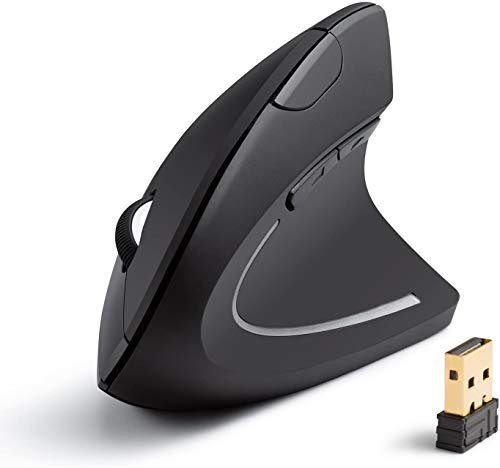
Anker mice are generally good if your main goal is a simple ergonomic office mouse, especially a vertical wireless model for everyday comfort rather than a broad gaming or productivity lineup. In the current Mice catalog, Anker's brand presence is represented by one vertical ergonomic model with 1,600 DPI, 125 Hz polling, 5 buttons, and battery life aimed at long low-maintenance office use rather than frequent charging.
The main strength is that the brand is very clear about its use case. Anker's current mouse direction is not trying to cover gaming, travel, ambidextrous variety, or premium enthusiast features. It is focused on a right-handed ergonomic office setup with wireless convenience.
The tradeoff is that Anker is much narrower than almost every major mouse brand. There is no real internal choice between shapes, weights, sensors, or price tiers in the current scope, so the brand only makes sense if this single ergonomic direction already matches what you want.
What are the main advantages of Anker mice?
The main advantages of Anker mice are as follows.
- Clear ergonomic focus: Anker's current mouse direction is centered on a vertical ergonomic shape instead of trying to cover every use case. That makes the brand easier to understand if comfort and wrist angle matter more than broad feature variety. - Affordable pricing: The listed Anker mouse sits around £20, which keeps the brand in a very accessible range. That is useful if you want an ergonomic office mouse without paying premium prices. - Wireless everyday convenience: The current Anker model combines its ergonomic design with simple wireless use, so it works well for desk setups where cable management matters. This fits office or home-work use better than a wired-only approach. - Low-maintenance battery behavior: The current mouse is built to last a long time in ordinary office use rather than needing frequent charging or battery changes. That is a practical advantage for buyers who just want a simple daily-work mouse. - Straightforward control layout: The current model uses 5 buttons and 1,600 DPI, which is simple enough for everyday navigation without becoming complicated. This works well for users who want a learning-free office mouse. - Right-handed comfort-first design: The mouse is clearly aimed at right-handed users who want a fuller ergonomic grip. That makes it a more specialized comfort tool than a generic flat travel mouse.
What are the main disadvantages of Anker mice?
The main disadvantages of Anker mice are as follows.
- Extremely narrow lineup: In the current Mice catalog, Anker has almost no internal variety. That means there is very little room to change direction if the shape, weight, or feature set does not suit you. - Low technical ceiling: The current Anker mouse stays at 1,600 DPI and 125 Hz polling, which is modest even for many office mice and far below gaming-oriented hardware. Buyers who care about speed or precision have stronger alternatives elsewhere. - No left-handed or ambidextrous alternative inside the brand scope: The current model is a right-handed ergonomic design, so Anker offers less flexibility if you want a flatter or more neutral shape. - Heavier office-style body: At about 102.4 g, the current Anker mouse is not especially light. That is acceptable for comfort-oriented office use, but it is not ideal if you prefer a quicker or lower-fatigue feel. - Limited specialization beyond ergonomics: The brand's current mouse presence is mainly about vertical comfort rather than about travel use, gaming, creator features, or silent multi-device variety. That makes Anker less versatile than broader mouse brands. - Weak comparison depth against major brands: Because the range is so small, Anker does not give you multiple price or performance steps inside the brand. If you want to compare several internal tiers before buying, Anker is not built for that.